Showing posts with label Phone. Show all posts

Smartphone Application for Property Agent Must be Installed!

Smartphone Application for Property Agent Must be Installed!


Property brokerage activities of daily very closely with the bustle and high mobility. To achieve the sales target amid the hectic time, they should be able to take advantage of technological advances. One of them through software or sophisticated applications that can simplify the process of advertising online or upload listings.

Yes, lately many varieties available free smartphone application that could facilitate the work of the office. Curious any application that must be downloaded in the smart phone real estate agent? This is the app for you.

Property Agent


Editing photo

Photo is an important content that reinforces the marketability listingan. To maximize the quality of home photos, either interior or exterior, it does not hurt to give a little touch of editing. One photo editing application that is very popular in use is PicsArt - Photo Studio.
With the number of users of 250 million people and a positive review, you should choose this as a flagship editing application. Starting from changing the color saturation, and filter effects, crop photos, create collages, as well as adding a logo on the photo. That way you can edit the photos in quick time.
Besides PicsArt, other photo editing application that is widely used Android and iPhone users is Adobe Photoshop Express and Pixlr Express.

Application Support Sales

When finished editing the photo listingan so aesthetically proportioned and attractive to sell, you are ready to upload to the property marketplace. Now, upload your ad listingan become easier with Agent Net applications.
AgentNet is a portal that can be used to manage your ads. You can create and change the listings to promote your property. You live upload photos, videos (if any), and a description of the property as possible.
Besides Agent Net, there is also the application of e-Property track (Ept) which can support the process of sale of the property of the Agent. Through this application, you can monitor the unit which has or has not sold to the buyer. That way you can be a sales presentation with more practical and real time. 

Interior Design Recommendations

Although you are not consulting an architect or interior design, but not infrequently there are clients who ask about the precise spatial arrangement. If you want to give shade designs that suit the tastes of consumers, some of these applications can help you.
To design the layout of the rooms in the house, you can try the application Floor Plane Creator. This application is very fitting to arrange the interior layout with ease, and has been downloaded more than 1 million users with a size of 2.6 MB only.
Meanwhile, if you want to design a house with a three-dimensional visual like a game, download an app Home Design 3D. This application has a satisfactory appearance but large enough size of about 287 MB. 

Reminder Important Things

With a variety of activities that must be completed within 8 to 9 hours of work, the agents must always remember with a series of work. But for those who are often forgotten, there is no harm in downloading apps like Wunderlist and Todoist reminder: To-Do List. Generally, each smartphone also has been equipped by the reminder application that you can use.


delete

Cash Rewards: Paypal Gift Cards

Cash Rewards: Paypal Gift Cards

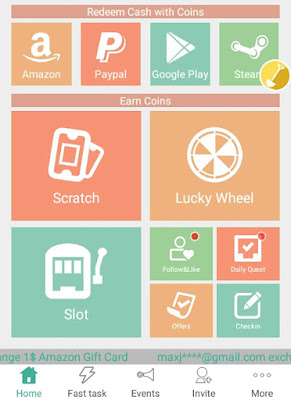
Start earning cash from your smartphone. Download the cash Reward App these days downloading apps, looking videos, finishing offers, referring friends, taking part in games and more. Cash Reward may be a nice choice for earning a bit more payment benefit your spare time. Points you earn is redeemed for money through PayPal or Gift Cards.

Cash Rewards: Paypal Gift Cards


Cash Rewards App, Free Gift Cards Reward


Cash Rewards is an easy however fun app that permits you to make cash by completing typical tasks that you simply get with most get paid to apps. You'll earn points through installing apps, look free ads, enjoying free games and inviting your friends to join. This app additionally offers you points to check in daily.

Cashing out is easy with this app, you'll either cash out with PayPal or receive an Amazon gift card. To cash out with PayPal, simply accumulate 600 coins and you'll receive $1.


Much more new options have come! With money rewards, you get real money by Earn Coins:


  • Scratch
  • rules: Spend 3 coins to win piles of coins
  • Slot
  • rules: The maximum bet is between 10 and your coins/10. Two same fruits get double coins reward. Three same fruits get four times of coins reward
  • Lucky Wheel
  • Finish Offers
  • Daily check-in
  • Daily Quest
  • Follow other Instagram users to earn coins. Don't unfollow in at least 1 week.


REDEEM  cash with Coins:

$1, $2, $5, $10 PayPal Gift Card
$1, $2, $5, $10 Amazon Gift Card
$2, $5, $10, $20 Steam Gift Card
$10, $25, $50 iTunes Gift Card
$10, $15, $25, $50 Google Play Gift Card


Cash Rewards is an impressive way to get cash rewards. a spread of offers and features enable you to earn cash with nice joy. Everything you get in money rewards is paid out through PayPal or Amazon gift cards. No any limitations there therefore you'll even try $1 with solely 600 Points.

Download cash rewards currently for FREE!

Click this for download


Thousands of latest offers are lined informed their way to cash rewards!
If you have got any queries or suggestions, please be happy to contact us.

delete

How To Get Surveys On GOOGLE OPINION REWARDS

How To Get Surveys On GOOGLE OPINION REWARDS

Google Opinion Rewards could be a nice app that let’s you answer client surveys and earn free Google Play credit whereas doing thus. The idea is pretty straightforward: Google is causation you client surveys supported places that you simply visit, things that you simply get or search for online. currently i do know that several of you're afraid currently, however Google is tracking most of these items already, largely for Ad functions.

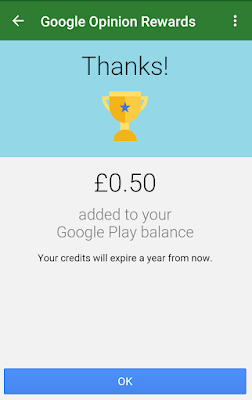
With client surveys you’re essentially giving them further data, however a minimum of you’re obtaining paid to try and do thus. At most, you wish to answer 10 queries per survey and you’ll receive up to $ 1.00 in Google Play credits. there's no pay-out limit, thus ranging from the primary survey, you’ll be ready to use the Google Play credit for apps, in-app purchases, books or anything that you simply will notice on Google Play. however watch out – Google Opinion Rewards won’t cause you to made. On average, you’ll receive one survey per week, though results might vary supported your knowledge and habits.


How To Get Surveys On GOOGLE OPINION REWARDS


Google Opinion Rewards lets you earn money to spend in the Play Store


One of the simplest ways in which to urge android apps at no cost is to use the Google Opinion Rewards app, a mobile survey tool that rewards you with profit your Google account anytime you complete a number of transient queries. With over five million installs, this is often a preferred app, however square measure you creating the simplest of it? might you be creating more cash with Google Opinion Rewards?

Before we glance at however you'll be able to tempt Google into supplying you with more cash, we want to require a glance at simply however Google Opinion Rewards works. maybe you’ve ne'er used it, or even you’ve used it once and forgot all regarding it.
Once put in from the Google Play Store and launched, Google Opinion Rewards needs you to sign into your usual Google account. you must to then receive a preliminary  survey, part to create certain you perceive your half during this interdependent relationship, and part to determine your demographic.

Google Opinion Rewards surveys you supported recent searching experiences. thus as long as you've got been searching, you must to be ready to give a solution.
Surveys take around ten seconds to complete, and nearly always find yourself with a number of cents being adscititious to your account. Over the course of a number of weeks you'll be able to find yourself with enough credit to pay within the Play Store! once you’re able to get, undergo the same old method, making certain that your Google Play balance is chosen as a payment kind, and click on get.


How to sign up for Google Opinion Rewards

  1. Download and Install the App from Google Play
  2. If you’re mistreatment multiple Google accounts on your android device, choose the one that's signed-up for wallet
  3. Answer initial queries. Google may send you surveys supported the information nominative there
  4. You’re all set-up. anticipate surveys to pop-up in your notifications

Please be aware that Google Opinion Rewards might use the language of your home country as defined in your Google Wallet account. After researching this issue on Google, I found that many people have this problem, but no solution was available.


Now that we all know however it works, let’s check out the way to create more cash.


Enable Location Services


While you would possibly get queries regarding on-line purchases, a good deal of the surveys from Google Opinion Rewards relate to your last journeys. With location services enabled in android, you get a much better likelihood of receiving surveys that raise you regarding wherever you went.
Well, in most cases, the knowledge is gathered to assist improve Google Maps. you'll be able to make sure the correct Location setting is chosen by gap Settings > Location, enabling  the feature, and setting Mode to High accuracy.
his mode uses GPS, WiFi, Bluetooth, and mobile networks to determine your location, and is that the most reliable possibility. Note that it’s additionally a privacy tract, which it’s possible to scale back your battery life quickly, however. For these reasons, you would possibly would like to avoid this feature.

Keep the App Updated


Changes to the survey assortment system might not be compatible with older versions of Google Opinion Rewards, thus having the foremost recent version of the app put in could be a major advantage.
To ensure that applications is up to date, open the Play Store on your phone, move to the menu and choose Settings. From here, faucet Auto-update apps and make sure the setting is enabled; the Auto-update apps over WiFi solely possibility is sometimes the simplest.


Go to Google Opinion Rewards App Daily


Some users reckon that gap the app daily can let Google apprehend that you’re interested, however it's unlikely that this truly works. It’s still a decent plan to open the app each day, though.
While you would possibly be taking surveys by clicking the Google Opinion Rewards app notifications after they seem, gap the app daily can place you into a decent habit, and there's some proof that fast completion of surveys can end in additional. If you’re checking frequently, you've got a far better likelihood of finishing surveys quickly.


Tell the reality


Cheaters never prosper appears to be a rather archaic maxim recently, however within the case of Google Opinion Rewards, it’s correct. Somehow, they apprehend once your survey answers square measure inaccurate, and can penalize you with a reduced rate of surveys. this is often done by providing you with “fake” surveys; if a you receive such a survey, be honest.

Trick queries may involve asking you if you visited a selected location that you simply didn’t visit, or engaged during a specific activity (perhaps skydiving). They’re simply noticed, however you’ll receive fewer pretend surveys if you answer honestly. If you lie, say bye to Google Opinion Rewards for a short while.

Be associate degree Affluent feminine


It appears that high-spending, frequently searching ladies get additional opportunities to generating rewards with the Google Reward Opinions.
If you’re not associate degree affluent feminine, you'll be able to make sure that you’re given with additional surveys by repetition some easy behaviors. Regular searching visits to well-known stores is that the best thanks to do that. Sitting around reception isn't the thanks to generate surveys from Google!

Don’t Let Your Rewards Run Out!


It’s a pleasant feeling to examine the balance in your Play Store account rising. on every occasion you complete a survey, your updated balance are displayed, as you save for a brand new app or game.
Google Opinion Rewards credit expires once 12 months, thus you wish to stay mistreatment the app and disbursal the credits. If you don’t, you’ll have wasted some time and energy.

A good thanks to stop this happening is to stay an inventory of apps and games that you simply need to shop for. You'll be able to do that by marking them for later, by clicking the add wishlist button. Wishlist things are often viewed by clicking My wishlist in Google Play.

I hope that i used to be ready to offer you a decent begin for Google Opinion Surveys. If you've got any further concepts to urge additional surveys, please be happy to share them within the comment section below.

delete

Earn Money By WHAFF LOCKER

Earn Money By WHAFF LOCKER

WHAFF LOCKER IS FINALLY HERE! have you ever enjoyed WHAFF REWARDS? Here ‘s the latest addition from the popular rewards app WHAFF REWARDS, the More Cash, a lot of Offers, the simplest Rewards from WHAFF. Must-have app of the us! Move aside! the simplest rewards app ever is here! 

What it Whaff Locker?

Whaff locker is the app where you'll be able to Earn cash by simply unlocking your phone and redeem it with paypal or exchange with Gift Cards like google play. Usually they're Giving 0.005$ every unlocking your phone lock.

This application is easy, once the smartphone is locked and sleep the application method can run Whaff locker and lock the screen of your smartphone,

When the screen is turned on, there'll be associate degree advertising screen, you just swipe to the right and you can get the fastest and rewards or slide to the left to initial browse the ad and they will pay.

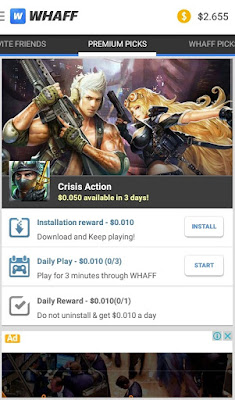
To earn a lot of usd, you would like to try and do some tasks offered by Whaff like putting in apps or games that you'll be able to realize within the "Premium picks" tab. You'll be able to additionally maintaining the apps/games you download to spice up your earnings as a result of by doing it you'll get earning bonus each day as a result of the apps/games still put in on your phone.


How To Earn cash From WHAFF Locker ?

  1. Download and install Whaff Locker to your phone from Play Store
  2. Login with Facebook Account and you will get an additional $ 0.100 
  3. At the moment Enter This invite Code : EU65446 then you'll get $0.300, If you're already invite on Whaff Rewards it doesn't work. The a lot of friends you invited, the a lot of earned cash gain 
  4. And once your phone is locked you only unlock your phone and acquire $ 0.005 each time you open it 
  5. Once your earning have reach $11 or a lot of, you'll be able to redeem it 
  6. Open whaff locker app, tap on the whaff locker brand on the left top tap "Payout" 
  7. Select paypal or gift cards as yspan redeem choice then tap on it tap "Request" 
  8. At the moment your earning are going to be charged so as to induce the steam gift card code, you would like to attend three - five days to receive the steam gift card code for confirmation and validation. Typically it takes one days on behalf of me once creating payout, however it additionally depends on whaff team.
Earn Money By WHAFF LOCKER


Latest information Whaff Rewards by Application Its New specifically Whaff Locker, whaff increasing the worth payments become higher in every download, watch, and play games, therefore I extremely suggest the simplest applications within the world for you to undertake to look at no cost, additionally to very simply and quickly whaff offer the best price for all of us.

Downloading the application is reccomended by Whaff, therefore applications Whaff Rewards already providing support applications unit out there for download for users Whaff, any application or game downloaded  exchange for a dollar between $ 0.10 - $ 0.30 within the app every download.

Enjoy. Share your invite code!
Get $0.300 every time your friends register with your code!

What are you waiting for
Thanks!!!

delete

Whaff Rewards | How To Get Money Using Android

Whaff Rewards | How To Get Money Using Android


Whaff Best Reward App

Whaff Rewards is an application for android which may be found in the Google Play Store for free. Whaff Rewards is a promotion application, wherever producer or technologist purchased the Whaff users who download their applications through whaff. There lots of tasks can be done by all whaff user and whaff will provide rewards to their user who has done the task. There are lots of create cash apps for associate Android device or perhaps iPhone, but for me, Whaff Rewards is one amongst the simplest cash creating apps for Android. Is it Whaff really pay or simply is it a scam application? Ok, here i might review this application. Whaff only runs in Android operation system, and it's not on the market for iPhone or perhaps Windows phone. 


How to Run?
  • First install Whaff Rewards app on the Google Play Store
  • Sign in using your Facebook account 
  • Read the first How to Use it to finish (IMPORTANT!), With the [NEXT]
  • When finished press the [START] and you'll get an extra $ 0.100 first
  • Then just enter Invitation Code - enter EU65446, then you will get $ 0.300 instantly
  • BE CAREFUL not to enter an invitation code, if one of you only get $ 0.100 and only then if for Use  whaff not you pass through.
  • Install applications on PREMIUM PICKS, just run for 2 minutes or more
  • You may uninstall PREMIUM PICKS if the application is not there.
  • Install the app also whaff picks, this section, if it's already obtaining notifications on the status bar, you can uninstall.

Whaff Rewards


VERY IMPORTANT...!

Do not use invite Code that create a review on Google Play Store, as a result of that person is already in prohibited by the whaff and you may not get a bonus. And don't use a VPN or Proxy, as a result of if it's better-known to be subject to sanctions whaff prohibited / Block.

Yes simply install the WHAFF application then performing some task like installing, playing and keeping an application on your device. You'll be able to do all those things whereas you're lying down in your bed, sit on your lounge or perhaps whereas you're defecating. however keep in mind don't use any uncommon access like mistreatment any of VPN, Proxy you furthermore might prohibited to mistreatment whaff on multiple devises, Bluestack, Youwave, or another reasonably Android emulators. And additionally prohibited to mistreatment multiple user IDs in one device. folks that wish to earn mistreatment this application, they'll download Whaff from Google Play store. When you download whaff from google play store and put in it on your Android device, open and login to whaff. Uses your Facebook ID and countersign, don’t worry your personal data can stay secret and saved.

Start Earning Premium Picks Here you'll be able to do the task of Downloading the applications, then run it, keep in mind to not uninstall it till the mission finish as a result of you may get the rewards too. Run the Applications through Whaff daily and obtain the cash.

Whaff Picks Here lots of Downloading task, download all application and run it through Whaff you may get the cash. however a number of these requests only support within the sure country only, however don’t worry there are still ton off applications to be downloaded. In Whaff Picks, you'll be able to invite your Facebook friends to earn $0.300 for one friend. Rewards whaff also a daily prize every midnight or 24:00 every day, can be done afterwards, before the next day.

Try each day click Check your attendance and get $ 0.020 rewards and if it is then it'll change into a click Today's attendance checked! and will receive .

When your balance reaches $10, you'll be able to exchange with Gift Cards like Google Play, POKECOINS, STEAM, PLAYSTATION, NETFLIX, AMAZON, BLIZZARD  and Facebook GiftCard. you'll be able to additionally send you balance to your PAYPAL or SKRILL.

Please check back for payments mistreatment PayPal if writing to the correct PayPal account, if wrong please contact support@whaff.com


delete